You deployed the AI agents. They're running. Things seem faster. But when your client asks "what exactly is the AI doing?" — can you actually answer that?
This is the quiet tension at the centre of most early AI deployments. The technology works. The time savings are real. But the visibility layer — the ability to explain, audit, and demonstrate what your AI workforce is doing — is often an afterthought. Sometimes it's not there at all.
For service businesses, that's a problem. You're not running a factory where output can be measured in units per hour. Your work involves client relationships, professional judgment, and deliverables that carry your firm's name. "The AI handled it" is not an answer your clients will accept, and it shouldn't be an answer you're comfortable giving.
This guide is about fixing that gap — building real visibility into your AI operations so you can run confidently, explain clearly, and trust completely.
The Visibility Problem Nobody Talks About
Here's how AI adoption typically plays out at a service business. A firm deploys agents to handle reporting, invoice checks, and project monitoring. Within a few weeks, the admin burden drops noticeably. People have more time. The initial reaction is positive.
Then something goes slightly wrong. A report has an error. A client question comes in that nobody can answer with certainty. A team member makes a decision based on AI-flagged data — and the data turns out to be from the wrong time period.
The investigation that follows reveals the real problem: nobody can reconstruct exactly what happened. The agents were running, but there was no clear record of what they did, what inputs they used, what they decided to surface and what they filtered out.
This isn't a failure of AI capability. It's a failure of oversight design. And it's far more common than most vendors will admit.
The fix isn't to add more agents or buy more computing power. It's to build a visibility layer that gives your team a clear, auditable view of everything your AI workforce is doing — in language that doesn't require an engineering degree to understand.
What Good AI Oversight Actually Looks Like
Good oversight has three components: activity logs, approval queues, and output review. Together, they give you a complete picture of your AI operations without requiring you to watch every agent in real time.
Activity Logs: The Permanent Record
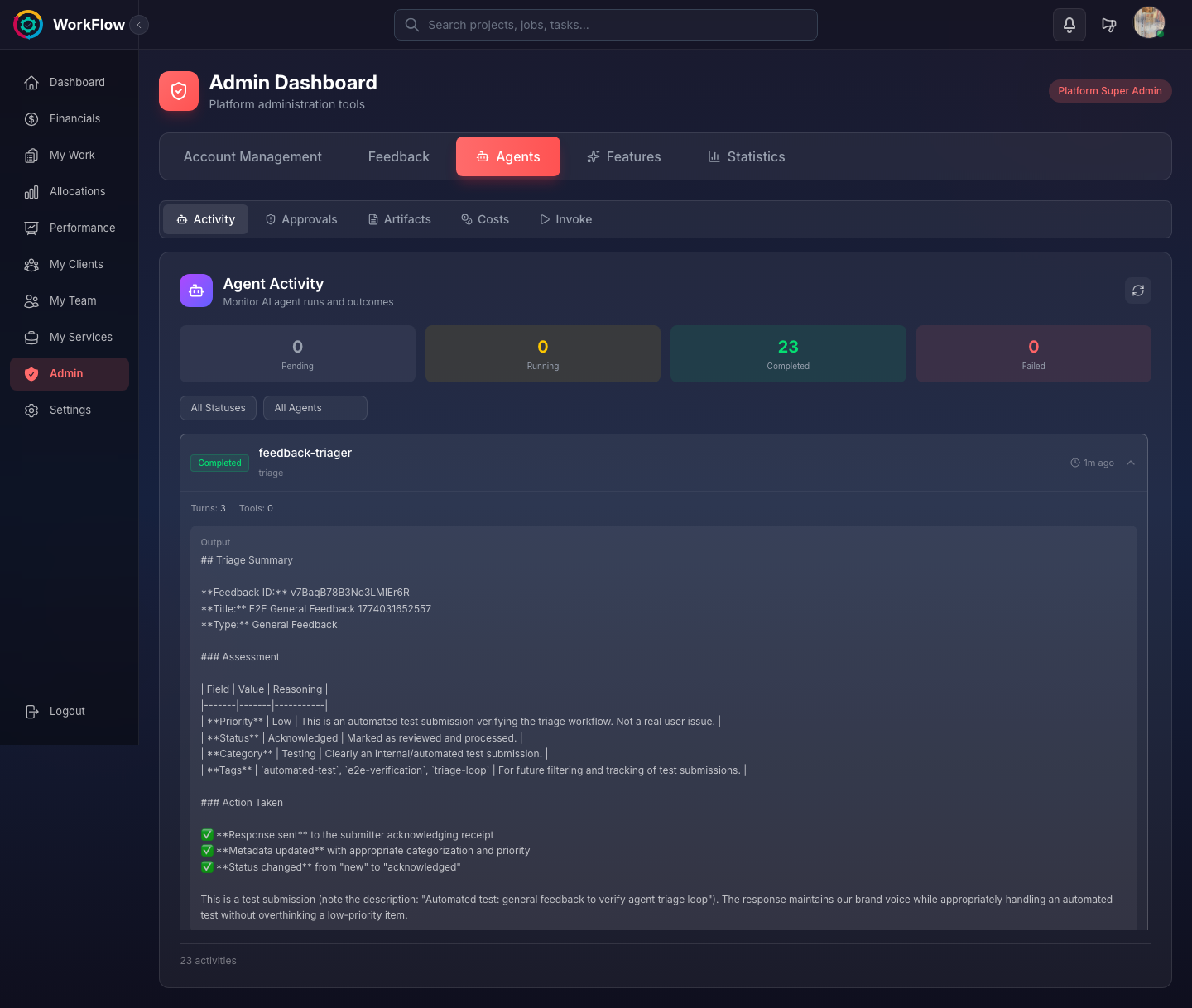
Every agent action should be logged automatically: what task it ran, when it ran, what data it accessed, and what output it produced. These logs serve two purposes. Day-to-day, they're how your team checks whether agents ran correctly. Long-term, they're your audit trail — evidence of what your AI did and when, which matters for client billing, compliance, and accountability.
A well-designed activity log should be searchable and filterable. You should be able to pull up every action a specific agent took in the past 30 days, or find every output that touched a particular client's data, in seconds — not minutes.
Logs that exist but can't be easily searched provide false comfort. They look like accountability but function like a filing cabinet nobody ever opens.
Approval Queues: Human Judgment at the Right Moments
Not every AI output should go straight to final use. Well-designed agents route certain outputs through a human review step before they're acted on — client-facing reports, significant financial flags, anything that touches compliance or billing.
The approval queue is where that happens. It's a holding area for agent outputs that need a human sign-off before they proceed. Your team can review, approve, modify, or reject an agent's work — and that decision is itself logged.
The goal isn't to review everything — that would defeat the purpose of AI automation. The goal is to review the right things. Lower-stakes, well-established outputs can run automatically. Higher-stakes outputs go through a quick human check before they're used. Over time, as you build confidence in specific agent behaviours, you can adjust what requires approval and what doesn't.
Output Review: Spot-Checking for Quality
Even outputs that don't go through an approval queue should be spot-checked periodically. This isn't about distrust — it's about maintaining quality standards as your data and workflows evolve.
A good practice is to review a sample of each agent's recent outputs once a week. Not to verify every detail, but to catch any drift in quality before it becomes a pattern. If you notice an agent's summaries are consistently missing context, or its flags are generating false positives, you want to catch that early.
Why Service Businesses Need This More Than Anyone
Many of the early AI oversight conversations have focused on enterprises — large organisations with dedicated AI governance teams and compliance departments. Service businesses get less attention, but they arguably need visibility more urgently.
Three specific pressures make this true.
Client billing. When your revenue is tied to time and deliverables, AI-generated work creates a legitimate question: how do you charge for something an agent did in 30 seconds that used to take three hours? You need a clear record of what work was done and how it was done — partly for your own records, partly because clients will ask. Without visibility, you can't answer that question with any confidence.
Professional accountability. In many service professions — accounting, legal, healthcare-adjacent services — there are regulatory expectations around documentation and process. If an AI agent flags a compliance issue or produces an output that informs a professional decision, you need a record of that. Not as a legal hedge, but as genuine professional practice.
Client trust. Your clients hired your firm, not your software stack. When they ask "who made this decision?" or "how was this report put together?", they expect a coherent answer. Visibility into your AI operations is what makes that answer possible. Without it, you're in the uncomfortable position of either being vague or admitting you don't entirely know.
The Daily Rhythm: Checking Your AI Dashboard in 5 Minutes
Once your visibility layer is set up correctly, daily oversight should not be a significant time investment. Here's what a five-minute daily check looks like in practice.
Morning activity summary (90 seconds). Open your AI dashboard and review what agents ran overnight or early morning. You're looking for any failed runs, any unusual activity, and a general confirmation that scheduled tasks completed. This is a scan, not a deep read.
Approval queue (2 minutes). Review items waiting for your sign-off. These are typically reports or flags that agents have prepared but held for human review. Approve the ones that look right, modify any that need adjustment, and flag anything that needs investigation. On a normal day, this queue should be short.
Priority flags (90 seconds). Check whether any agents have raised items that need attention today. Overdue invoices, budget thresholds crossed, capacity warnings. These aren't crises — they're early signals. Decide which ones need action today and which can wait.
That's the whole routine on a normal day. The five-minute check isn't about micromanaging your AI workforce — it's about maintaining awareness so that small issues don't quietly compound into large ones.
From Visibility to Confidence: How Oversight Builds Team Trust in AI
One of the less obvious benefits of good visibility is what it does for your team's relationship with AI tools.
When team members can see what the agents are doing — when they can check an activity log and understand why a flag was raised, or review an approval queue and see the reasoning behind an output — their confidence in the system grows. They stop treating AI outputs as black-box results to be accepted or rejected on instinct, and start engaging with them as information they can verify and build on.
This matters for adoption. The most common reason AI tools fail to deliver their full value isn't technical — it's human. Teams that don't trust an AI system work around it. They re-do the work manually "just to be sure." They ignore flags. They add their own parallel processes.
Visibility is the antidote to that. When people can see the work, they can trust it. When they can trust it, they use it. When they use it consistently, the time savings actually materialise.
The same logic applies to client relationships. A client who can see a clear record of what your AI agents did — and confirm that every output went through human review before it reached them — is far more comfortable with AI-assisted work than one who's been given vague reassurances. Visibility converts scepticism into confidence.
Evaluating AI Platforms: A Visibility Checklist
If you're evaluating AI platforms for your service business, visibility capabilities should be near the top of your criteria list. Here's what to look for:
- Persistent activity logs — Every agent action is recorded with timestamp, input data, and output. Logs are searchable and filterable by agent, date range, client, or task type.
- Configurable approval queues — You can define which outputs require human review before proceeding and adjust those rules without needing technical support.
- Human-in-the-loop design — The platform is built with human oversight as a default, not an afterthought. Approval steps are a core feature, not a bolt-on.
- Output history — You can retrieve any previous agent output at any time, not just the most recent run.
- Anomaly flags — The system actively alerts you when an agent behaves differently from its established pattern, rather than expecting you to notice on your own.
- Client-ready reporting — You can generate a summary of AI activity for a specific client or project if asked — not a technical log, but a clear narrative of what was done and when.
- No-code oversight — Business users can review, approve, and manage agent outputs without requiring technical skills or engineering support.
Platforms that check all of these boxes are genuinely built for professional service environments. Platforms that treat visibility as a secondary concern — activity logs buried in settings, no approval workflows, no anomaly detection — are built for technical teams, not service businesses.
Mi👻i is built around human-in-the-loop oversight from the ground up. Every agent surfaces its work for review, logs every action automatically, and routes the right outputs through human approval before they're used. Your team stays in control — the agents just make sure the right information reaches the right people at the right time.
For more on how AI agents can take on the repetitive layer of your operations, see our guide to how AI agents handle busywork and what that means for your team's actual role. If you're ready to explore what this looks like across your full workflow, see all Workflow features.
Frequently Asked Questions
What should an AI dashboard show?
A good AI dashboard should show recent agent activity (what ran, when, and what output it produced), any items currently waiting for human review or approval, a summary of completed actions and their outcomes, and any anomalies or flags the agents have raised. You should be able to scan it in under five minutes and know exactly what your AI workforce did in the past 24 hours.
Can clients see AI work?
That depends on how you configure your platform and what you choose to share. Some firms share AI-generated reports directly with clients as part of their deliverables. Others use AI internally and share only the polished output. The important thing is that you have a clear audit trail of what was done — whether you share it with clients is a business decision, not a technical constraint.
How much time does AI oversight take?
When your visibility tools are set up well, a daily check-in should take five minutes or less. You review the activity summary, clear any items in the approval queue, and address any flags. If oversight is taking significantly longer than that, it usually means the agents aren't configured correctly or you're reviewing outputs that should be auto-approved based on established rules.
Do I need technical skills to oversee AI agents?
No. Good AI platforms are built so that business users — not engineers — can review and manage agent activity. You need to understand your business processes well enough to know whether an agent's output looks right, but you don't need to understand how the agent works to oversee it effectively. Think of it the same way you review work from a new team member: you evaluate the output, not the method.
See exactly what your AI agents are doing — in real time
Mi👻i is built with human-in-the-loop oversight as a core feature. Every agent action is logged, every key output goes through your approval queue, and your team stays fully in control.
Explore Mi👻i Agents See All Features